

预览
前置 Mod

详情
信息
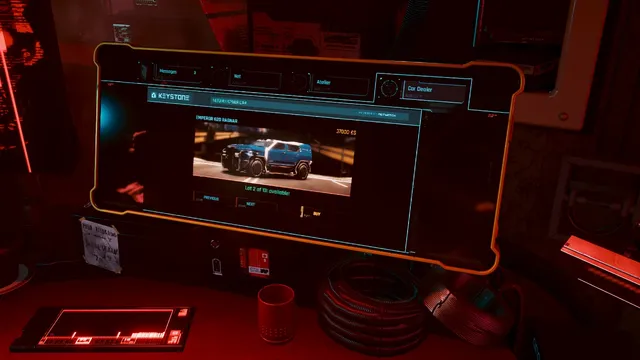
虚拟汽车经销商 (Virtual Car Dealer) 添加了一个新的游戏内商店,你可以在任意公寓中通过电脑访问(方式与 Virtual Atelier 相同)。它会检查是否安装了任何受支持的载具模组,并将所有检测到的记录直接显示为可购买的车辆。
面向模组作者 - 添加新车辆
这里唯一的要求是你已使用 TweakXL 定义了你的车辆。虚拟汽车经销商 (Virtual Car Dealer) 会在车辆记录中查找几个已定义的 flat,如果找到记录,就会添加一个新的可购买物品:
- dealerPrice - 车辆售价 - Int
- dealerCred - 解锁购买所需的街头声望 - Int
- dealerAtlasPath - 完整车辆预览图所用 inkatlas 资源的路径 - String
- dealerPartName - inkatlas 内的纹理部件名称 - String
- dealerVariants - 基础车辆记录的额外颜色变体 - 字符串数组
例如,如果你创建了一个 id 为 Vehicle.my.custom_vehicle 的新车辆(并将其追加到 Vehicle.vehicle_list.list),那么新增的行可能如下所示:
Vehicle.my.custom_vehicle.dealerPrice: 123000
Vehicle.my.custom_vehicle.dealerCred: 20
Vehicle.my.custom_vehicle.dealerAtlasPath: "base/gameplay/gui/common/icons/codex/assets_fullscreen25.inkatlas"
Vehicle.my.custom_vehicle.dealerPartName: "v_makigai_maimai_basic_suburban_05_full"
如果你要制作颜色变体,那么请为基础记录声明 dealerPrice、dealerCred 和 dealerVariants,并为每个颜色变体单独声明 dealerAtlasPath 和 dealerPartName,然后将颜色变体记录追加到 Vehicle.vehicle_list(但不要追加基础记录)。示例:
Vehicle.my.custom_vehicle.blue.dealerAtlasPath: "your/path/to/inkatlas.inkatlas"
Vehicle.my.custom_vehicle.blue.dealerPartName: "your_blue_preview_icon"

Vehicle.my.custom_vehicle.green.dealerAtlasPath: "your/path/to/inkatlas.inkatlas"
Vehicle.my.custom_vehicle.green.dealerPartName: "your_green_preview_icon"

Vehicle.my.custom_vehicle.dealerPrice: 123000
Vehicle.my.custom_vehicle.dealerCred: 20
Vehicle.my.custom_vehicle.dealerVariants:
  - "Vehicle.my.custom_vehicle.blue"
  - "Vehicle.my.custom_vehicle.green"

# And somewhere in your tweak file
Vehicle.vehicle_list.list:
  - !append t"Vehicle.my.custom_vehicle.blue"
  - !append t"Vehicle.my.custom_vehicle.green"
对于我的示例车辆包,我使用了 codex 中的预览图,尺寸为 1860x609,所以最好制作类似的东西(或者你也可以直接复用 codex 的图片)。车辆召唤小组件的预览图宽度应为 470 px。
如何安装
- 下载并安装所有必需的文件
- 下载模组压缩包,并将两者都解压到游戏文件夹
如何卸载
- 打开 CET 控制台并执行以下命令:ClearSoldVehicles()
- 删除 Cyberpunk 2077\r6\scripts\VirtualCarDealer 文件夹
- 删除 Cyberpunk 2077\r6\tweaks\VirtualCarDealer 文件夹
- 从 Cyberpunk 2077\archive\pc\mod 文件夹中删除 VirtualCarDealer.archive 和 VirtualCarDealer.archive.xl。
翻译
如果你想把这个模组翻译成你自己的语言,请下载 Translation sources 压缩包,用任意文本编辑器打开 vdealer.json(我推荐 Notepad++),并且只翻译带有 "femaleVariant" 键的行(示例截图来自另一个模组,你需要修改的文本已用黄色标出)。之后在这里下方的表格中查看你的语言对应的代码,并将翻译好的文件发回给我。
目前支持的语言:
- 英语
- 俄语
- 法语(鸣谢 Unseen Unit)
- 繁体中文(鸣谢 hansdofer)
- 波兰语(鸣谢 george173)
- 西班牙语(鸣谢 iguruspain)
- 意大利语(鸣谢 NarakuITA)
- 土耳其语(鸣谢 CalvinQuantine)
- 巴西葡萄牙语(鸣谢 F4xUu)
- 日语(鸣谢 onepkvn1)
- 简体中文(鸣谢 HarryGu)
- 捷克语(鸣谢 Starfis)
- 德语(鸣谢 Somerov)
- 韩语(鸣谢 MoookGwak)
鸣谢
- jekky 提供 redscript 编译器
- WopsS 提供 RED4ext
- psiberx 提供 codeware 及其他内容
- e256 在纹理、测试和支持方面提供了巨大帮助
- Alien 提供 inkatlas-utils photoshop 插件
我的其他模组
- Virtual Atelier Delivery
- Cutscene Weapon Swapper
- Revised Backpack
- Deus Ex Themed Palette
- HUD Painter
- Stash and Backpack Search
- Metro Pocket Guide
- Quickhack Hotkeys
- Wannabe Edgerunner
- Stash Filters
- Immersive Timeskip
- Faster Iguana Hatch
- Real Vendor Names
- Mark To Sell
- Stand Still Please
- Vehicle Pack - Basic
- Vehicle Pack - Corpo
- Vehicle Pack - Utility
- Vehicle Pack - Gangs
- Mizutani Shion Targa MZT
- Named Saves
- Virtual Car Dealer
- Virtual Atelier
- Enhanced Craft
- No Scanner Time Dilation
- Custom Map Markers
- Sleeves
- Toggle Quest Tags
- Improved Minimap Zoom
- Hide Read Shards
- Smarter Scrapper
- Reduced Loot
- Limited HUD
- HUDitor
- Always First Equip
- No Camera Auto Centering
- Holster By Hotkey
- Limited Fast Travel
- Game Time Tweaks
- Muted Markers
- Yet Another UI Recolor
- Game Time Tweaks
- No Intro Videos